---
title: How do I delete an account or my personal data?
description: FAQ
---
[Skip to content](https://support.teachneli.org/how-do-i-delete-an-account-or-my-personal-data#main-content)
English - United Kingdom
Show submenu for translations
[More support](https://support.teachneli.org/kb-tickets/new?hsLang=en-gb)

Open main navigation
Close main navigation
- English - United Kingdom
Show submenu for translations
- [More support](https://support.teachneli.org/kb-tickets/new)
- Contact us
Contact us
How can we help you?
- There are no suggestions because the search field is empty.
1. [FAQ - TeachNELI](https://support.teachneli.org/?hsLang=en-gb)
2. [Account and School Data Management](https://support.teachneli.org/account-and-school-data-management?hsLang=en-gb)
3. [Account Management and Subscriptions](https://support.teachneli.org/account-and-school-data-management?hsLang=en-gb#account-management-and-subscriptions)
# How do I delete an account or my personal data?
NOTE: School, user, pupil and assessment data are managed within the OxEd web platform. To delete any school, user or pupil data from OxEd’s web portal, you must be the Owner or Admin of the relevant school account. To find out the Owner and Admins for your school, log into your school account and select the Users tab.
### **Deletion of personal and assessment data stored on mobile devices:**
OxEd’s mobile applications do not use or store personal details of teachers, pupils or schools. No login is required to use the apps.
Completed assessment data is deleted from a device once it has been uploaded to OxEd’s web portal, after which it can be managed on the web portal (see below). Partially completed assessments can be deleted from the app’s home screen by selecting ‘Resume Assessment’ then the ‘Delete’ button for the assessment.
### **Deletion of a School Account:**
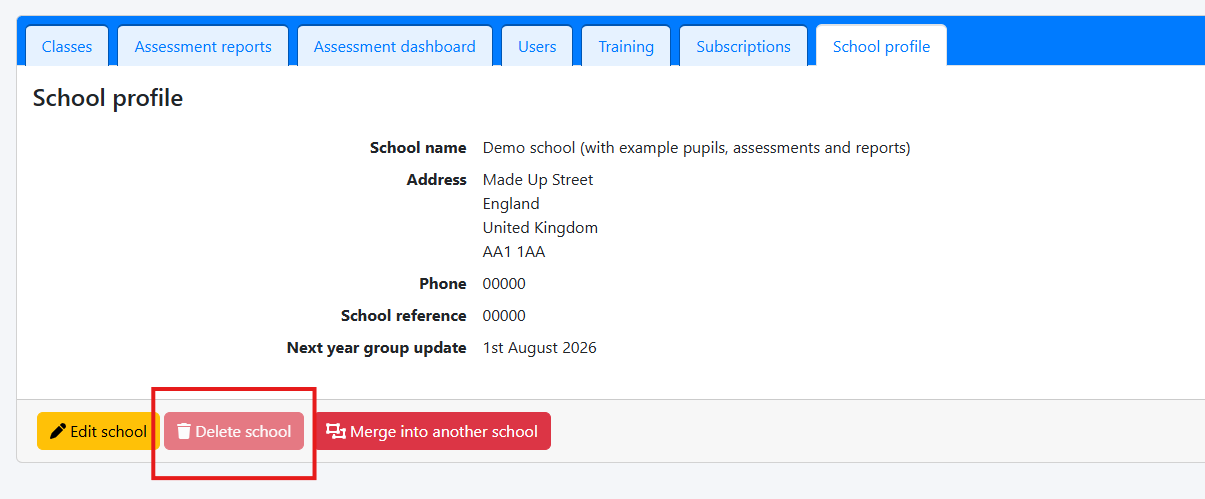
To delete a school’s account you must first delete all students and classes. Once this has been done, please navigate to ‘School profile’ and press the red button ‘Delete school’.
Please note any student, assessment, class and unused subscriptions will be lost if deleted and are non-recoverable.
### **Deletion of your User account:**
To delete your OxEd user profile and give up access to any school/s you are permitted to access, please contact our support team by emailing [support@oxedandassessment.com](mailto:support@oxedandassessment.com) making this request.
### **Deletion of a Pupil’s data:**
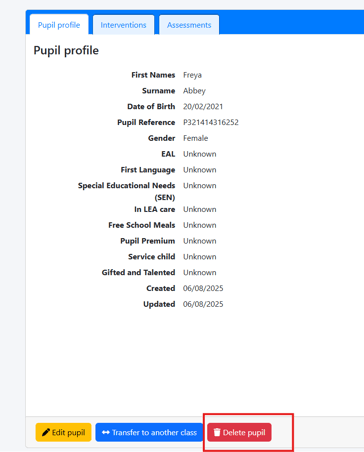
To delete a pupil’s profile and associated assessment and intervention data, go to the pupil’s profile and select ‘Delete pupil’.
### **Deletion of an Assessment:**
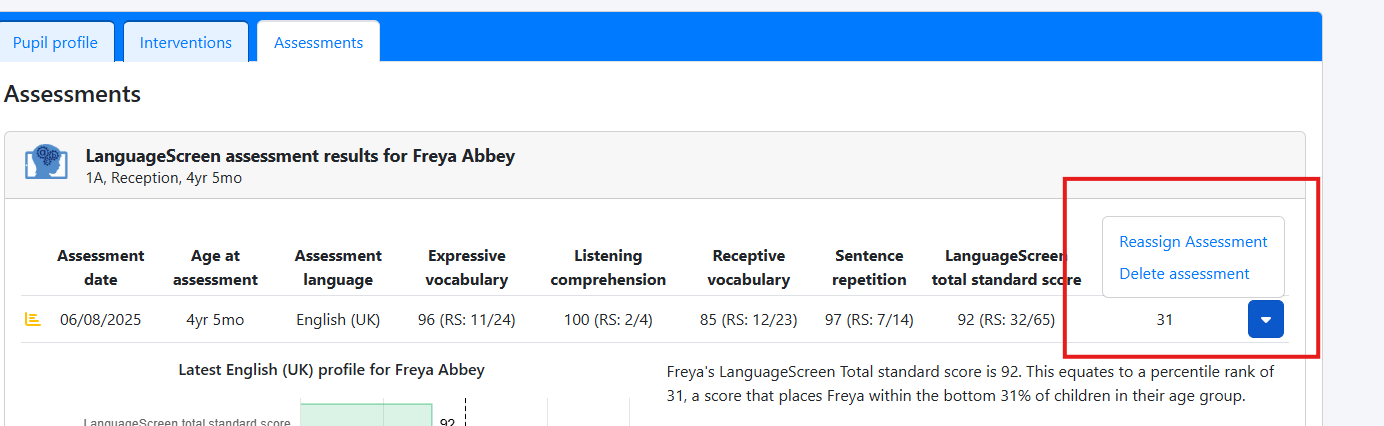
To delete data for an individual assessment, go to the relevant pupil profile, select the Assessments tab, locate the assessment, select the arrow button to show assessment tools, and select ‘Delete assessment’.
- [NELI Intervention and NELI Training](https://support.teachneli.org/neli-intervention-and-neli-training?hsLang=en-gb#main-content)
- [NELI - the Nuffield Early Learning Intervention](https://support.teachneli.org/neli-intervention-and-neli-training?hsLang=en-gb#neli-the-nuffield-early-learning-intervention)
- [Downloadable Elements of NELI Resource Kits](https://support.teachneli.org/neli-intervention-and-neli-training?hsLang=en-gb#downloadable-elements-of-neli-resource-kits)
- [Identifying pupils to receive NELI](https://support.teachneli.org/neli-intervention-and-neli-training?hsLang=en-gb#identifying-pupils-to-receive-neli)
- [NELI Training on the FutureLearn platform](https://support.teachneli.org/neli-intervention-and-neli-training?hsLang=en-gb#neli-training-on-the-futurelearn-platform)
- [Account and School Data Management](https://support.teachneli.org/account-and-school-data-management?hsLang=en-gb#main-content)
- [Account Management and Subscriptions](https://support.teachneli.org/account-and-school-data-management?hsLang=en-gb#account-management-and-subscriptions)
- [Account Creation and Login](https://support.teachneli.org/account-and-school-data-management?hsLang=en-gb#account-creation-and-login)
- [Managing School Data](https://support.teachneli.org/account-and-school-data-management?hsLang=en-gb#managing-school-data)
- [Assessments](https://support.teachneli.org/assessments?hsLang=en-gb#main-content)
- [Using LanguageScreen](https://support.teachneli.org/assessments?hsLang=en-gb#using-languagescreen)
- [Using ReadingScreen](https://support.teachneli.org/assessments?hsLang=en-gb#using-readingscreen)
- [How to See Assessment Results – Reporting Help](https://support.teachneli.org/assessments?hsLang=en-gb#how-to-see-assessment-results-reporting-help)
- [How to Assess Pupils](https://support.teachneli.org/assessments?hsLang=en-gb#how-to-assess-pupils)
[](https://oxedandassessment.com/)
Copyright © 2026, OxEd & Assessment